50 Free AI Credits — No API Key Required

Your Complete AI-Powered
Job Search & Interview Toolkit

Desktop app and Chrome extension with 20+ features. Practice mock interviews, optimize your CV, generate cover letters, discover jobs, and prepare like never before — powered by 6 AI models.

20+ Features
6 AI Models
4 Platforms
Chrome Extension
50 Free Credits

Everything You Need to
Land Your Dream Job

20+ AI-powered tools for interview prep, job search, networking, and productivity.

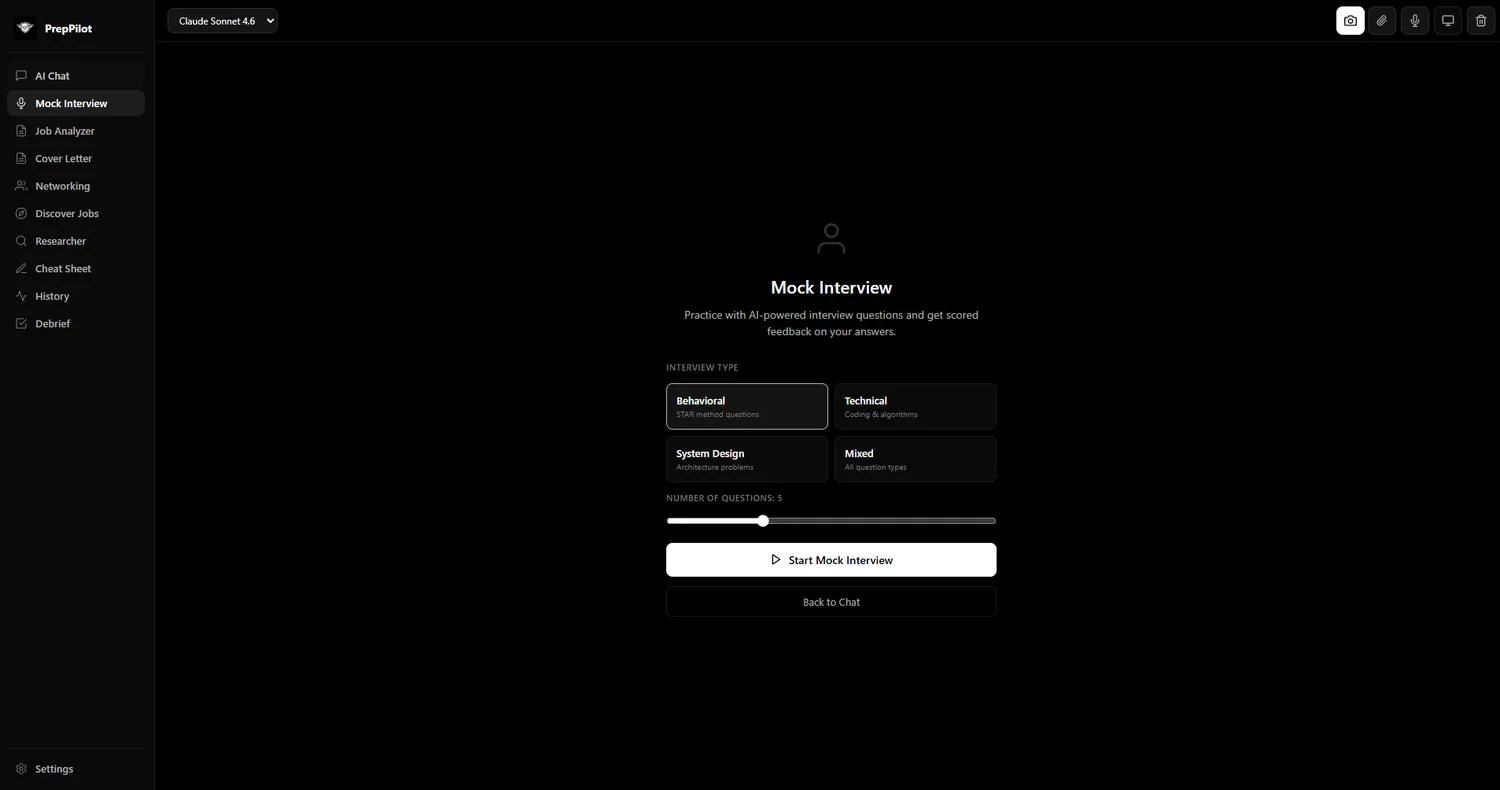
Mock Interview Mode

AI plays the interviewer. Practice behavioral, technical, and system design questions with STAR-scored answers and detailed feedback.

Confidence Scoring

Real-time filler word detection, words-per-minute tracking, and clarity scoring while you speak your answers.

Voice Input (Whisper)

Speak your answers naturally in mock interviews and chat. Auto-continue recording resumes the mic after each AI response.

Post-Interview Debrief

Record what happened after each interview. Get AI analysis, performance insights, and auto-generated thank-you email drafts.

Smart Cheat Sheet

Big-O notation, algorithm patterns, and data structure references — always accessible via the floating overlay.

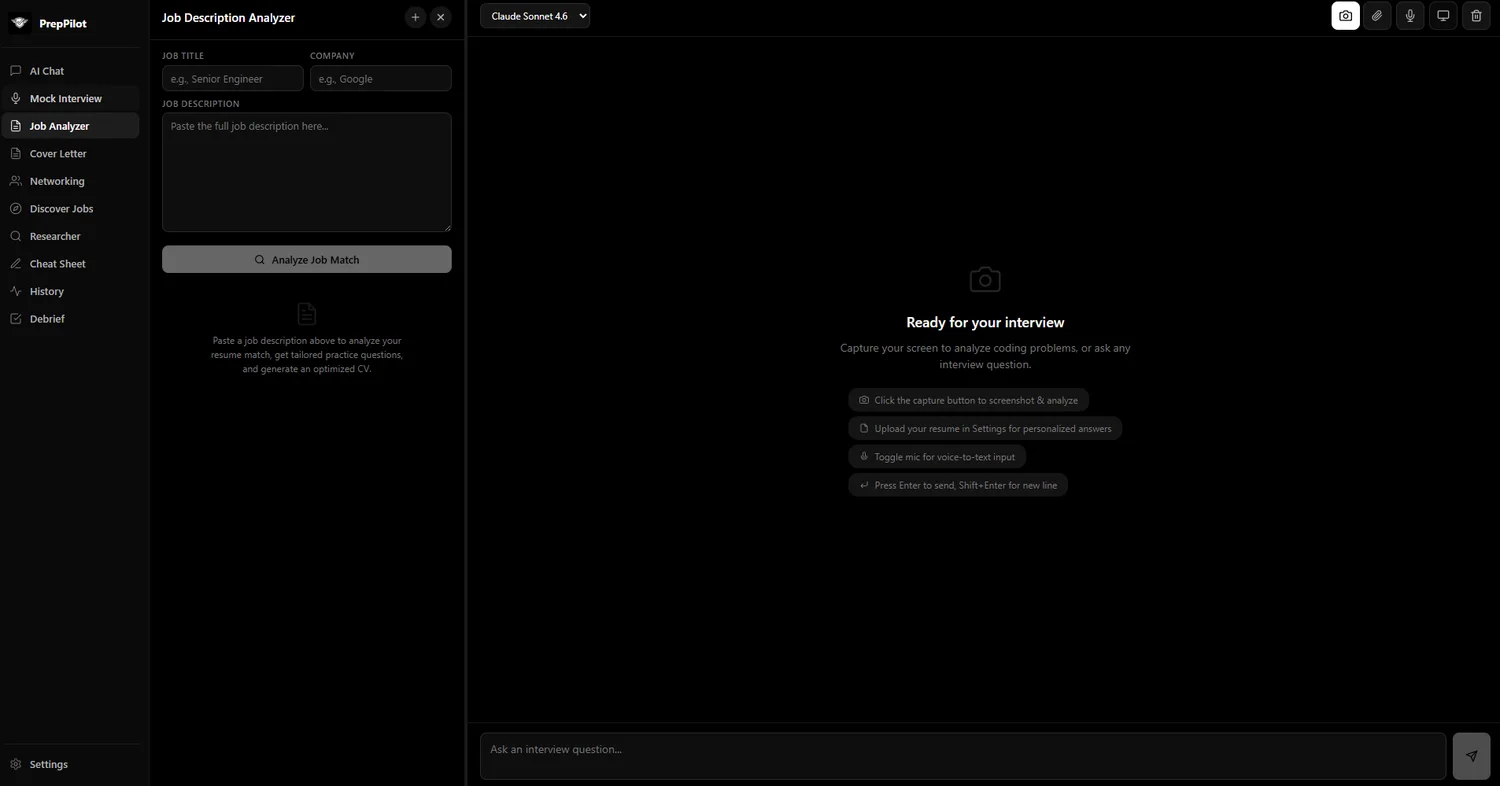
Job Description Analyzer

Paste any job description, get a match score against your resume, skill gap analysis, and CV optimization suggestions with DOCX/PDF export.

CV Template Builder

Upload your CV template and let AI auto-optimize it for each job application. Maintains your formatting while tailoring content.

Cover Letter Generator

AI-generated cover letters tailored to each job description. Save, edit, and copy with one click.

Discover Jobs

Career page crawler and LinkedIn search integration. Find relevant openings without leaving the app.

Networking & Outreach

Generate connection requests, follow-up messages, thank-you notes, and cold outreach templates tailored to each contact.

Interviewer Research

AI-powered research on your interviewers and companies. Know who you're talking to before you walk in.

LinkedIn Integration

Chrome extension auto-detects LinkedIn job postings. Analyze, track, and apply to jobs without leaving your browser.

AI Chat

Conversational AI assistant for interview prep, career advice, and any job search question. Powered by your choice of 6 models.

Screen Capture & Analysis

Capture coding problems from any screen and get instant AI-powered analysis and solutions.

Multi-Language Code

Translate code between 8 languages: Python, JavaScript, Java, C++, Go, Rust, TypeScript, and C#.

Floating Stealth Overlay

Always-on-top stealth pill that stays visible during live interviews. Screen-capture protected so only you can see it.

Answer History & Dashboard

Track all practice sessions, view stats, maintain streaks, and get AI-generated study plans to improve over time.

6 AI Models

Claude Sonnet 4.6, Claude Opus 4.6, Claude Haiku 4.5, GPT-5.3, Gemini 3.1 Pro, and Gemini 3 Flash. Switch anytime from the toolbar.

Cross-Platform Sync

Sync your settings, resume, and API keys between the desktop app and Chrome extension via encrypted Supabase cloud.

Resizable Panels

Drag to resize context panels. Customize your workspace layout for the most comfortable prep experience.

PrepPilot in Your Browser

All the power of the desktop app, right in your Chrome sidebar. Works on any webpage.

Submitted to Chrome Web Store — install manually for now

Your AI job search companion, built into Chrome

Detect LinkedIn job postings automatically, analyze jobs, optimize your CV, write cover letters, and research companies — all from the browser sidebar without switching apps.
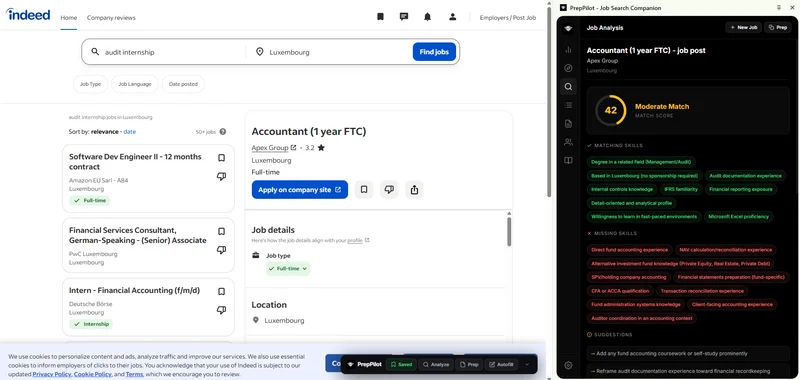
  • LinkedIn Job Detection — Auto-detects job postings on LinkedIn pages
  • Side Panel — Full-featured AI assistant in Chrome sidebar
  • Job Tracking — Track applications across all job sites
  • Cover Letter & Networking — Same features as desktop, in browser
  • CV Optimization — Optimize your CV for detected jobs instantly
  • Shadow DOM Overlay — Floating overlay on any webpage

How to Install

  1. Download the ZIP file
  2. Extract to a folder
  3. Go to chrome://extensions
  4. Enable Developer Mode
  5. Click "Load unpacked" & select folder

Try PrepPilot Without API Keys

50
Free AI Credits

Every new account gets 50 free AI credits to explore all features without configuring any API keys. Use them for mock interviews, job analysis, cover letters, or anything else.

Create Free Account
No credit card No API keys needed All features included Add API keys for unlimited

Up and Running in 4 Steps

No complicated setup. Sign up, download, and start practicing in minutes.

1

Sign Up

Create a free account with your email. Takes 30 seconds.

2

Download

Get the desktop app for Windows, macOS, or Linux. Install the Chrome extension too.

3

Try Free

Use your 50 free AI credits to explore mock interviews, job analysis, cover letters, and more.

4

Go Unlimited

Add your own Anthropic, OpenAI, or Google API key for unlimited usage. Your keys stay local.

See PrepPilot in Action

A clean, focused interface designed for distraction-free job search and interview preparation.

PrepPilot - AI Job Search & Interview Toolkit
PrepPilot Desktop App - AI Chat interface with sidebar navigation
PrepPilot Desktop App - Mock Interview setup with Behavioral, Technical, System Design, and Mixed interview types
PrepPilot Desktop App - Job Description Analyzer with job title, company, and description fields
Built with Tauri 2.0
Powered by Claude, GPT & Gemini
100% Local & Private
Chrome Extension

Available on All Platforms

Download PrepPilot for your operating system. Free forever with your own API keys.

Windows
64-bit (.msi)
Download
macOS (ARM)
Apple Silicon (.dmg)
Download
macOS (Intel)
x64 (.dmg)
Download
Linux
Debian (.deb)
Download

Start Preparing for Free

Create an account to download PrepPilot and get 50 free AI credits. No API key required to start.

Frequently Asked Questions

Yes! PrepPilot is free to download and includes 50 free AI credits to get started without any API keys. For unlimited use, add your own API keys from Anthropic (Claude), OpenAI (GPT), or Google (Gemini). These providers offer generous free tiers to get you started.
Every new PrepPilot account receives 50 free AI credits. Each credit corresponds to one AI interaction (a mock interview question, a job analysis, a cover letter generation, etc.). You can use all features without configuring any API keys. When your credits run out, simply add your own API key for unlimited access.
PrepPilot is available for Windows (64-bit .msi), macOS (Apple Silicon .dmg & Intel .dmg), and Linux (.deb package). There is also a Chrome extension that works in any Chromium-based browser. Built with Tauri 2.0 for native performance on all platforms.
The PrepPilot Chrome extension brings the key features of the desktop app into your browser. It auto-detects LinkedIn job postings, provides a full-featured AI assistant in the browser sidebar, lets you track job applications, generate cover letters, optimize your CV, and research companies. It has been submitted to the Chrome Web Store and can be installed manually in the meantime.
Cross-platform sync uses Supabase to securely store your settings, resume, and API keys so they are available on both the desktop app and Chrome extension. Your data is encrypted and only accessible with your account credentials. Chat history and mock interview sessions remain local on your machine.
PrepPilot runs locally on your machine. Your API keys, chat history, and mock interview sessions stay on your computer. The only network calls are directly to the AI provider APIs (Anthropic, OpenAI, or Google) using your own keys, and optional cross-platform sync for settings via encrypted Supabase.
PrepPilot supports six AI models: Claude Sonnet 4.6, Claude Opus 4.6, and Claude Haiku 4.5 from Anthropic, GPT-5.3 from OpenAI, and Gemini 3.1 Pro and Gemini 3 Flash from Google. Switch models at any time from the toolbar.
PrepPilot includes a stealth floating overlay mode that stays on top of other windows and is screen-capture protected. It's designed to be a discrete companion. Use it responsibly and at your own discretion.
PrepPilot offers a desktop app for Windows, macOS, and Linux plus a Chrome extension, while Final Round AI is web-only. PrepPilot supports 6 AI models (Claude, GPT, Gemini) giving you choice and flexibility. PrepPilot also includes networking and outreach tools, CV optimization with DOCX/PDF export, and 50 free credits with no credit card required.
PrepPilot is the most comprehensive AI interview prep tool in 2026, combining mock interviews, job description analysis, CV optimization, cover letter generation, networking outreach, and job discovery in one platform. Unlike tools like Teal (job tracking only) or Jobscan (ATS scanning only), PrepPilot is an all-in-one solution with 20+ features.
Yes. PrepPilot's Job Description Analyzer extracts key skills and requirements from any job posting, then its CV Optimizer restructures your resume to match. You can export optimized resumes as DOCX or PDF files, ready to submit through any ATS system.
Yes. The PrepPilot Chrome Extension integrates directly with LinkedIn to auto-detect job postings, extract job details, and help you craft personalized connection messages and follow-ups. The desktop app also includes networking and outreach tools for LinkedIn messaging.
PrepPilot simulates realistic interview scenarios using AI. Choose your interview type (behavioral, technical, case study, or custom), select an AI model, and practice with voice input or text. The AI provides STAR-method scoring, detailed feedback, and improvement suggestions after each response.
Yes. Every new user gets 50 free AI credits — no API keys or credit card required. These credits let you try all features including mock interviews, CV optimization, cover letters, and job analysis. For unlimited use, add your own API keys from Anthropic, OpenAI, or Google.
While ChatGPT is a general-purpose AI, PrepPilot is purpose-built for job searching and interview preparation. It includes specialized features like STAR-method scoring, ATS resume optimization, job description analysis, cover letter templates, interviewer research tools, and a stealth overlay mode for live interview assistance that ChatGPT cannot provide.
PrepPilot includes a Floating Stealth Overlay mode designed for discrete use. The overlay sits on top of other windows and can be quickly hidden. However, we recommend using PrepPilot primarily for preparation and practice rather than during live interviews, as ethical considerations vary by employer.
Navigate to the Cover Letter panel in the desktop app, enter the job title, company name, and paste the job description. PrepPilot's AI will generate a tailored, professional cover letter that you can edit, copy, or save. The Chrome Extension can also generate cover letters directly from LinkedIn job postings.
PrepPilot supports six AI models: Claude Sonnet 4.6 and Claude Opus 4.6 from Anthropic, GPT-5.3 from OpenAI, and Gemini 3.1 Pro and Gemini 3 Flash from Google. Each model has different strengths — Claude excels at nuanced responses, GPT at broad knowledge, and Gemini at speed.
Yes. PrepPilot's Networking & Outreach feature generates personalized connection requests, follow-up messages, thank you notes, and cold outreach messages. Enter the recipient's name, title, and company, and the AI crafts professional, natural-sounding messages tailored to your situation.
PrepPilot runs locally on your machine by default. Your API keys, interview history, and personal data stay on your computer. Optional cloud sync via encrypted Supabase is available if you want to access your data across devices, but it's entirely opt-in.
Download the extension ZIP file from our download page, unzip it, then open Chrome and navigate to chrome://extensions. Enable Developer Mode, click “Load unpacked,” and select the unzipped folder. The extension will appear in your Chrome toolbar immediately.
Yes. Paste any job description into the Job Description Analyzer and PrepPilot will extract required skills, experience levels, qualifications, and key responsibilities. It then provides a match score comparing the job requirements to your profile and suggests improvements.
PrepPilot is currently available as a desktop application for Windows, macOS (both Apple Silicon and Intel), and Linux, plus a Chrome browser extension. Mobile apps are planned for a future release.
PrepPilot is free to download and includes 50 free AI credits. For unlimited use, bring your own API keys from Anthropic (Claude), OpenAI (GPT), or Google (Gemini). There are no monthly subscriptions, hidden fees, or auto-charging trials.
Yes. PrepPilot supports technical interview preparation including coding challenges, system design questions, and technical concept reviews. The AI adapts its questions and feedback based on the role and technology stack you specify.
PrepPilot can export optimized CVs and cover letters as DOCX (Microsoft Word) and PDF files. You can also copy formatted text directly to your clipboard for pasting into online application forms.
PrepPilot requires an internet connection for AI-powered features since it communicates with AI provider APIs (Anthropic, OpenAI, Google). However, your data, settings, and saved content are stored locally and accessible offline.
Teal focuses on job tracking and resume building, while Jobscan specializes in ATS keyword matching. PrepPilot is a comprehensive all-in-one platform that includes both of these capabilities plus mock interviews, cover letter generation, networking outreach, interviewer research, and a Chrome extension — eliminating the need for multiple separate tools.